Blue Cove's sunset tour page is finally on Google. Great news. But two weeks later, it still gets almost no visitors.
The page is indexed, so Google has it. The problem is that nobody is searching for the words on it. This lesson is about fixing exactly that: finding the words people actually type into Google, using only free tools. That's what keyword research for beginners really means. No expensive software, no complicated spreadsheets.
And good news: this lesson is completely code-free.
🦉 Remember from lesson 2?
Search Console says a page is "Discovered – currently not indexed". What's usually the most helpful fix?
- A) Click "Request indexing" every day
- B) Link to the page from your other pages
- C) Delete the page and publish it again
Show the answerHide the answer
B) Link to the page from your other pages. "Discovered" means Google knows the page exists but hasn't visited it yet. Internal links show Google the page matters. That's exactly how Blue Cove got their sunset tour indexed in lesson 2.
What a keyword really is
A keyword is simply what someone types into Google. It can be one word ("kayak") or a whole sentence ("is kayaking safe for beginners").
Here's the part most beginners miss: keywords are the words your customers use, not the words you use.
Blue Cove's original tour page was titled "Sea Kayak Excursion: Explore the Cyclades Coastline". It sounds lovely. But tourists don't search for "sea kayak excursion". They search for things like:
- kayak tour naxos
- sunset kayaking naxos
- things to do in naxos
If your page doesn't use the words people search for, Google has a much harder time matching it to their search, and searchers are less likely to click.
Scout's mistake: "I described my business the way I talk about it at work." Industry words, brand names and clever phrases rarely match what people type. Ask yourself: what would a customer who has never heard of me type into Google?
Broad vs specific keywords
Not all keywords are equal. Blue Cove's first instinct was to rank for "kayak", a huge search. But think about who types "kayak":
- someone who wants to buy a kayak
- someone looking up kayak brands or prices
- someone planning a trip to Canada or Norway
- someone who wants to know how to pronounce it
Almost none of them want a sunset tour on Naxos. Now look at how the search gets more specific, step by step:
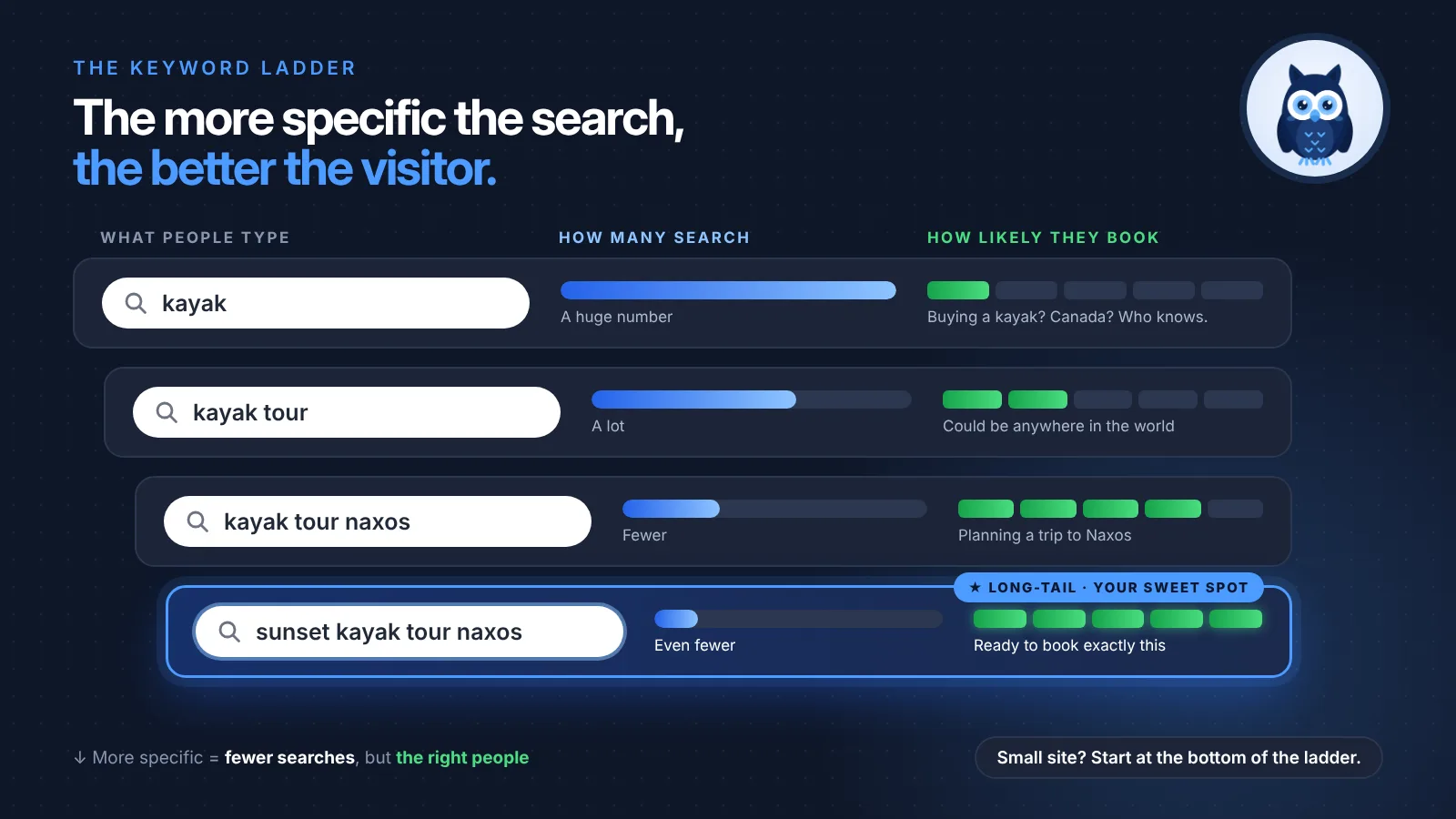
| Keyword | How many people search | How likely they are to book with Blue Cove |
|---|---|---|
| kayak | A huge number | Very unlikely |
| kayak tour | A lot | Unlikely: could be anywhere in the world |
| kayak tour naxos | Fewer | Likely |
| sunset kayak tour naxos | Even fewer | Very likely |
The longer, more specific searches at the bottom are called long-tail keywords. Each one has fewer searches, but the people typing them know exactly what they want. And a small site like Blue Cove has a real chance to appear for them, while "kayak" is dominated by huge brands and shops.
For a small site, long-tail keywords are where the wins are.
🦉 Quick check
Which keyword is Blue Cove most likely to get bookings from?
- A) kayak
- B) sunset kayak tour naxos
Show the answerHide the answer
B) sunset kayak tour naxos. Far fewer people search for it, but almost every one of them is a tourist planning exactly what Blue Cove offers. A thousand visitors who want to buy a kayak won't book a single tour.
4 free ways to find what people search
You don't need paid tools to start. These four free keyword research tools are all Blue Cove used.
1. Google autocomplete
Start typing into Google and stop before you finish. The suggestions that drop down are based on real searches people make.
Blue Cove typed "kayak naxos" and saw suggestions like "kayak naxos sunset", "kayak naxos beginners" and "kayak naxos price". Each one is a keyword idea, and a clue about what people care about (sunsets, being beginners, price).
Two tricks to get more ideas:
- Add a letter after your words: "kayak naxos a…", "kayak naxos b…" and so on. Each letter shows new suggestions.
- Add a question word before them: "how kayak naxos", "is kayaking…", "can you kayak…". This shows the questions people have.
Tip: Search in a private/incognito window, so your own past searches influence the suggestions less.
2. "People also ask" and "Related searches"
Search for your main topic and scroll. Many results pages have a "People also ask" box with questions, and related searches at the bottom of the page.
For "kayaking naxos", Blue Cove found questions like:
- Is kayaking safe for beginners?
- What should I wear for sea kayaking?
- What's the best time of day to kayak?
These are gold. Each question can become an FAQ on your page or a blog post of its own. Blue Cove's "Is sea kayaking safe for beginners?" post came straight from this box (more on that in the next lesson).
3. Google Trends: when people search
Google Trends shows how interest in a search changes over time. You won't see exact numbers, but you'll see the shape: when interest rises, peaks and drops.
For a tourism business like Blue Cove, the pattern is clear: searches about kayaking in Naxos climb in spring and peak in summer, and almost disappear in winter.
That changes when you should publish. A page needs time to get indexed and start ranking (remember lesson 2?). So Blue Cove publishes and updates their summer content in spring, not in July.
4. Search Console: the words that already bring you visitors
If you set up Search Console in lesson 2, you already have the best free keyword tool there is, with data about your site.
Open Performance → Search results, and look at the Queries tab. It lists the searches that made your pages appear on Google, with how many times you appeared (impressions) and how many people clicked (clicks).
Blue Cove found two surprises:
- People were finding them for "kayak rental naxos". They don't rent kayaks, but they could mention that tours are an option for people who've never kayaked.
- "Kayaking with kids naxos" had impressions but almost no clicks. Nothing on their site answered it. Families were a whole audience they'd ignored.
Good to know: a brand-new site will have little data here at first. Come back after a few weeks, as it grows over time.
🦉 Quick check
Where can you see the searches that already bring visitors to your own site?
- A) Google Trends
- B) Search Console → Performance → Queries
- C) Google autocomplete
Show the answerHide the answer
B) Search Console. Trends shows general interest over time and autocomplete shows what people in general search for. Only Search Console shows the searches that made your pages appear on Google.
What about search volume?
You might wonder: exactly how many people search for each keyword? Paid SEO tools and Google's Keyword Planner (free with a Google Ads account) can give you estimates, often as ranges like "100–1K a month".
As a beginner, you don't need exact numbers. If a search appears in autocomplete or "People also ask", enough people type it to be worth answering. Choosing the right keyword matters much more than choosing the biggest one.
Scout's mistake: "I asked an AI chatbot how many people search for my keyword, and wrote down the number." Chatbots often make up search numbers that sound precise. Use them for ideas, never for data.
How to choose the right keyword for each page
Now you have a long list of ideas. To pick the one each page should focus on, ask three questions:
- Is it relevant? Would someone who types this be happy to land on your page? If they'd leave disappointed, it's the wrong keyword.
- Is it specific enough? "Sunset kayak tour naxos" beats "kayak".
- Can your page truly answer it? If not, maybe it needs a different page, or a new one.
Make a simple keyword map
A keyword map is a small table that gives each important page one main keyword and one or two secondary keywords. It sounds technical, but it's just a list. Here's Blue Cove's:
| Page | Main keyword | Secondary keywords |
|---|---|---|
| Sunset kayak tour | sunset kayak tour naxos | sunset kayaking naxos, evening kayak trip |
| Beginners' tour | kayaking naxos for beginners | easy kayak tour naxos, first time kayaking |
| Family tour (new!) | kayaking with kids naxos | family kayak tour, kayaking for kids |
| Blog: hidden beaches | best beaches in naxos by kayak | hidden beaches naxos |
Two rules:
- One main keyword per page. It keeps each page focused.
- No two pages share the same main keyword. Otherwise they compete with each other, and Google has to guess which one to show.
🦉 Spot the mistake
Here's part of a keyword map. What's the problem?
| Page | Main keyword |
|---|---|
| Sunset kayak tour | sunset kayak tour naxos |
| Evening kayak tour | sunset kayak tour naxos |
Show the answerHide the answer
Both pages have the same main keyword, so they compete with each other. Google has to pick one, and might pick the weaker page. The fix: if they're really the same tour, merge them into one strong page. If they're different, give each its own keyword, e.g. "sunset kayak tour naxos" and "evening kayak trip with dinner naxos". You'll learn more about this in lesson 4.
Where do keywords go on the page?
Once you've chosen a keyword, use it naturally in the places Google and people read first:
- the title of the page
- the main heading (H1)
- the first paragraph
- the page's address (e.g.
/tours/sunset-kayak-tour)
Then write normally. Don't repeat the keyword over and over, because Google understands related words and phrases. Repeating "sunset kayak tour naxos" ten times just reads badly. Lesson 5 covers writing the page in detail, and How to write title tags that get clicked helps with titles right now.
What happened to Blue Cove?
Blue Cove renamed their tour page from "Sea Kayak Excursion" to "Sunset kayak tour in Naxos", made a keyword map for their five most important pages, added an FAQ from the "People also ask" questions, and started planning a family tour page.
Within a few weeks, Search Console started showing their tour page for searches like "sunset kayaking naxos". The same page, with the right words.
🦉 What would you do?
Google Trends shows that searches for kayaking in Naxos peak in July. When should Blue Cove publish their new "Best beaches in Naxos by kayak" guide?
- A) In July, when people are searching
- B) In spring, a few months before the peak
- C) In winter, then delete it in autumn
Show the answerHide the answer
B) In spring. A new page needs time to be found, indexed and start ranking. Publishing in spring means the page is ready and visible by the time interest peaks. In July it would arrive too late for most of the season.
Quick recap
- A keyword is what people type into Google. Use their words, not yours.
- Long-tail keywords are specific: fewer searches, but the right visitors, and easier to rank for.
- Keyword research for beginners needs only free tools: Google autocomplete, People also ask, Google Trends and Search Console queries.
- Make a keyword map: one main keyword per page, and no two pages sharing the same one.
Your 15-minute task
- Write down 5 words that describe what you offer.
- Type each into Google and note the autocomplete suggestions and "People also ask" questions.
- Pick your 3 most important pages and give each one main keyword in a simple keyword map.
You finished lesson 3. 🎉 That's 3 of 8 done.
Want every lesson of this series in one place? The SEO for Beginners Guide brings together all 8 lessons, every checklist (including a fill-in keyword map) and all the quick checks with answers, in one free PDF.
The guide for the SEO for Beginners series: the full checklist, free by email.
Next lesson
Blue Cove has the right words now. But there's a twist: their blog post was trying to rank for "book kayak tour naxos", and Google only shows booking pages for that search. In lesson 4, One page, one job, you'll learn how to match each keyword to the right type of page.
Want to go deeper on what searchers want? Read Search intent in plain language.
Sources and further reading
- SEO Starter Guide (Google Search Central): Google's own introduction, including thinking about the words people search for.
- Performance report (Search Console Help): what queries, clicks and impressions mean.
- Google Trends: explore how searches change over time and by region.