Some pages shouldn't be in Google: a thank-you page, an old price list, a test version of your site. Most people reach for robots.txt or a noindex, often both, and are surprised when the page shows up anyway. The two do different jobs. This lesson explains noindex vs robots.txt in plain language, plus three other tools that are sometimes the better choice, and how to get a page out of Google once it's already in.
No code needed for most of it. You'll need about 20 minutes and access to your website's settings.
New here? This is lesson 10 of the Technical SEO series. It works on its own, so you can start right here.
🦉 Remember from last lesson?
Blue Cove's robots.txt said Disallow: /tours. What did that block?
- A) Only the booking calendar addresses
- B) Every address starting with
/tours, including the sunset tour page - C) Nothing, robots.txt only works for Bing
Show the answerHide the answer
B) Every tour page. robots.txt rules match the start of the address. Blue Cove changed it to Disallow: /*?date=, which blocks only the calendar. Missed it? Lesson 9: Robots.txt explained walks through the fix.
Meet Blue Cove Kayaks
In this lesson we follow Blue Cove Kayaks (bluecove-kayaks.example), a family-run sea-kayaking tour company on Naxos. Blue Cove is made up. Its problems are real ones most small sites run into, but its story is an example, not real results.
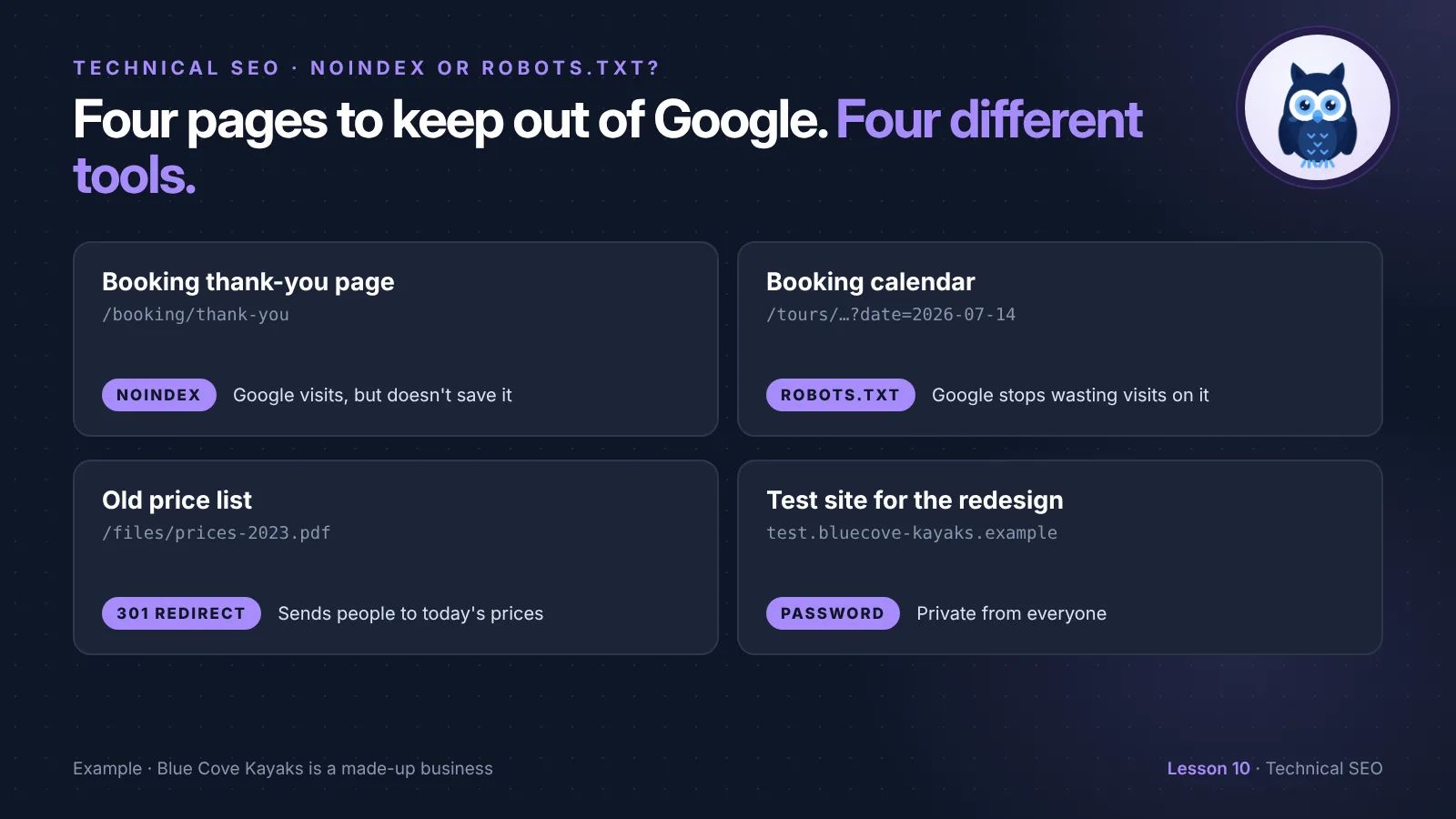
Blue Cove has learned this the hard way before. A few years ago, a forgotten noindex kept their whole Tours page out of Google. Now they have four pages that really should stay out:
- The booking thank-you page,
/booking/thank-you, that people see after they pay. - The booking calendar addresses, like
/tours/sunset-kayak-tour?date=2026-07-14. - An old price list,
/files/prices-2023.pdf, which still shows up in Google with the wrong prices. - A test copy of the website for next year's redesign, at
test.bluecove-kayaks.example.
Each one needs a different tool. Let's see why.
Stop the visit, or stop the save?
Google handles a page in steps: it crawls it (visits it), then indexes it (saves it so it can show in results). If that's new, lesson 1 explains it simply.
- robots.txt stops the visit. Google doesn't open the page. But if other pages link to it, Google can still save the address and show it in results, usually with no description.
- noindex stops the save. Google opens the page, reads "don't save me", and leaves it out of results.
That's the whole difference. robots.txt is for pages you don't want Google to spend time on. noindex is for pages you don't want in search results.
How to add a noindex
A noindex is one line in the <head> part of a page's code:
<meta name="robots" content="noindex">
name="robots"means "this is a message for every search engine".content="noindex"means "don't save this page".
No code needed. Most website builders and SEO plugins have a checkbox on each page, often called "Hide from search engines" or "Allow search engines to show this page". It adds the same line for you.
For files like PDFs, there's nowhere to put a meta tag. Instead, the server sends the instruction along with the file, in what's called an HTTP header:
X-Robots-Tag: noindex
This one usually needs your web host or developer. Ask them to "add an X-Robots-Tag noindex header to this file".
🦉 Quick check
Blue Cove's booking thank-you page should never show in Google. Which tool fits?
- A) robots.txt, so Google never visits it
- B) noindex, so Google can visit it but won't save it
- C) Delete the page
Show the answerHide the answer
B) noindex. It's a normal page that customers need, so deleting it is out. robots.txt would stop Google visiting, but if anything links to the page, its address could still turn up in results. A noindex keeps it out reliably.
Five ways to keep a page out of Google
robots.txt and noindex aren't the only options. Here's when to use each one:
| Tool | What it does | Use it for |
|---|---|---|
| noindex | Google visits, but doesn't save the page | Pages people need but searchers don't: thank-you pages, login pages, thin tag pages |
| robots.txt | Google doesn't visit | Thousands of useless addresses: calendars, filters, internal search |
| Password | Nobody gets in without logging in | Anything private, and test sites |
| Delete it (404 or 410) | The page is gone for everyone | Pages with no reason to exist any more |
| 301 redirect | Sends people and Google to a better page | Old pages that have a newer, similar page |
And one more, for emergencies: the Removals tool in Search Console hides a page from Google's results for about six months. It's quick, but it's temporary. Always use one of the five tools above as well, or the page comes back.
Scout's mistake: "I added a noindex to my old pages and blocked them in robots.txt, to be extra safe. Months later, they were still in Google." If robots.txt blocks a page, Google can't visit it, so it never sees the noindex. Pick one. To get a page out of Google, let Google visit it and read the noindex. Only add a robots.txt block later, if you have a crawling reason to.
How Blue Cove sorted its four pages
1. Booking thank-you page → noindex. They ticked "Hide from search engines" in the page settings. The page still works for customers.
2. Calendar addresses → robots.txt. There are thousands of them, and they're useless to searchers. Blue Cove wants Google to stop wasting visits on them, so Disallow: /*?date= (from lesson 9) is the right tool. Calendar dates also get booked out and disappear, so a few may linger in Google for a while. That's fine.
3. Old price list PDF → 301 redirect. At first, they asked their host for an X-Robots-Tag: noindex header. Then they realized the current Prices page answers the same question better, so they redirected the old PDF there instead. Searchers who find the old link now land on the right prices. (Lesson 4 covers redirects.)
4. Test site → password. Their developer had put a noindex on the test site. That keeps it out of Google, but anyone with the address can still look around, and the noindex risks being copied to the live site on launch day. A password solves both.
🦉 Spot the mistake
Blue Cove's old "Winter 2022 offers" page is still in Google. Their developer blocks it in robots.txt and adds a noindex, and waits. A month later it's still there. Why?
- A) Google needs a year to notice
- B) robots.txt stops Google visiting, so it never sees the noindex
- C) The page needs to be in the sitemap
Show the answerHide the answer
B) Google can't see the noindex. The fix is to remove the robots.txt rule, keep the noindex, and let Google visit again. Or, since the offer is gone, redirect the page to the current Offers page.
How to remove a page that's already in Google
When a page you don't want is already showing in Google:
- Decide what should happen to it. Keep it for visitors (noindex), send people somewhere better (301 redirect), or delete it (404 or 410).
- Make sure Google can visit it. Check that robots.txt doesn't block it, using the Robots.txt tester. Google has to visit to see the noindex, the redirect or the 404.
- Take it out of your sitemap. A sitemap should only list pages you want in Google. (Lesson 2 explains why.)
- Ask Google to look again. Use URL Inspection in Search Console and click Request indexing. It's not instant: depending on the page, it can take days or weeks.
- In a hurry? Use the Removals tool as well, to hide it for about six months while the real fix takes effect.
For private information that shouldn't be online at all, delete it or put it behind a password first, then use the Removals tool.
Launch-day checklist
Most "my new site isn't on Google" stories come down to settings that kept a test site out of Google and were never switched off. On the day a new or redesigned site goes live, check these:
- robots.txt doesn't say
Disallow: /underUser-agent: *. - No noindex on key pages. Check the homepage and a few key pages: view the source (Ctrl+U, or Cmd+Option+U on a Mac) and search for
noindex. Or scan them with the free SEO audit. - "Discourage search engines" is off. In WordPress, it's under Settings → Reading. Other builders have a similar switch, often called "Hide site from search engines".
- The password is gone from the live site, and still on the test site.
- Old addresses redirect to their new ones. (Lesson 4 has the redirect checklist.)
- URL Inspection says the homepage can be indexed. Click Test live URL to check the live version, not the one Google saved earlier.
🔎 From my own audits: I don't see the noindex plus robots.txt mix-up often, but I've found it a few times.
Must do vs go deeper
✅ Must do (about 20 minutes)
- Make a short list of pages that should stay out of Google, and choose one tool for each from the table above
- Check your key pages for a stray noindex, with the SEO audit or Ctrl+U
- Make sure no page has both a noindex and a robots.txt block
- Check that your sitemap doesn't list any noindex pages
🔍 Go deeper (optional)
- In Search Console, open Indexing → Pages and look at Excluded by 'noindex' tag. Is every page there one you meant to hide?
- Look at Indexed, though blocked by robots.txt. Those pages are in Google even though Google can't visit them. If you want them out, switch from robots.txt to noindex.
- Check your PDFs. Search Google for
site:yoursite.com filetype:pdf. Are any of them out of date? - If you have a test site, check that it needs a password.
🦉 What would you do?
Blue Cove's blog has 40 tag pages, like /blog/tag/naxos, each just a list of links to posts. Some show up in Google, looking thin and repetitive. Visitors do use them to browse. What do you suggest?
- A) Block them in robots.txt
- B) Add a noindex, so visitors can still use them but they stay out of search results
- C) Delete them all
Show the answerHide the answer
B) noindex. Visitors find them useful, so deleting them would hurt. robots.txt would stop Google visiting, but the ones already in Google could stay there. A noindex lets Google visit, read the instruction and drop them from results, while the links on them still help Google find your posts.
Quick recap
- robots.txt stops Google visiting a page. noindex stops Google saving it.
- A noindex only works if Google can visit the page, so don't block it in robots.txt too.
- For private pages and test sites, use a password. For pages with a better replacement, use a 301 redirect. For pages with no reason to exist, let them 404.
- The Removals tool hides a page for about six months. Use it with a real fix, not instead of one.
- On launch day, check robots.txt, noindex and the "discourage search engines" setting.
Your task (20 minutes): List the pages on your site that should stay out of Google, and check that each one uses exactly one of the five tools.
Lesson 10 of 11 done 🎉
The guide for the Technical SEO series: the full checklist, free by email.
Next up, lesson 11: Structured data for small businesses. Google can read Blue Cove's pages, but it still has to guess which number is the phone number and which hours are the opening hours. You'll learn how to tell it directly, with a few lines of code you don't have to write yourself.
Want to check your key pages for a stray noindex? Run the free SEO audit.
Sources and further reading
- Block search indexing with noindex (Google Search Central)
- Robots meta tag and X-Robots-Tag specifications (Google Search Central)
- Introduction to robots.txt (Google Search Central)
- Remove a page hosted on your site from Google (Google Search Central)
- Removals tool (Search Console Help)
- Page indexing report (Search Console Help)