Google is very good at reading pages, but it still has to guess. Is that number in the footer a phone number or a booking reference? Are those hours for the office or for the tours? Structured data removes the guesswork. It's a few lines of code that describe your page in a standard format Google can't misread. This lesson explains what it does, which types are worth it for a small business, and how to add your first one without writing code.
You'll need about 20 minutes, and a way to add code to your website's pages (most website builders have one).
New here? This is lesson 11 of the Technical SEO series. It works on its own, so you can start right here.
🦉 Remember from last lesson?
Blue Cove's booking thank-you page should stay out of Google. Which tool did they use?
- A) robots.txt
- B) noindex
- C) Both, to be safe
Show the answerHide the answer
B) noindex. Customers need the page, but searchers don't. A noindex lets Google visit it and read "don't save me". Using both is the mistake: robots.txt would stop Google from ever seeing the noindex. Missed it? Lesson 10: Noindex or robots.txt? covers all five tools.
Meet Blue Cove Kayaks
In this lesson we follow Blue Cove Kayaks (bluecove-kayaks.example), a family-run sea-kayaking tour company on Naxos. Blue Cove is made up. Its problems are real ones most small sites run into, but its story is an example, not real results.
Blue Cove's website has everything a visitor needs: the address at the harbour, a phone number in the footer, and seasonal opening hours, May to October only. But it's all just text. When people searched "Blue Cove Kayaks opening hours" in November, some found an old summer timetable from a travel blog. Blue Cove wanted to tell Google, clearly, what's true.
What structured data is
Structured data is a short block of code on a page that describes what's on it, using labels every search engine agrees on. Those labels come from a shared dictionary called schema.org, which is why people also call it schema markup.
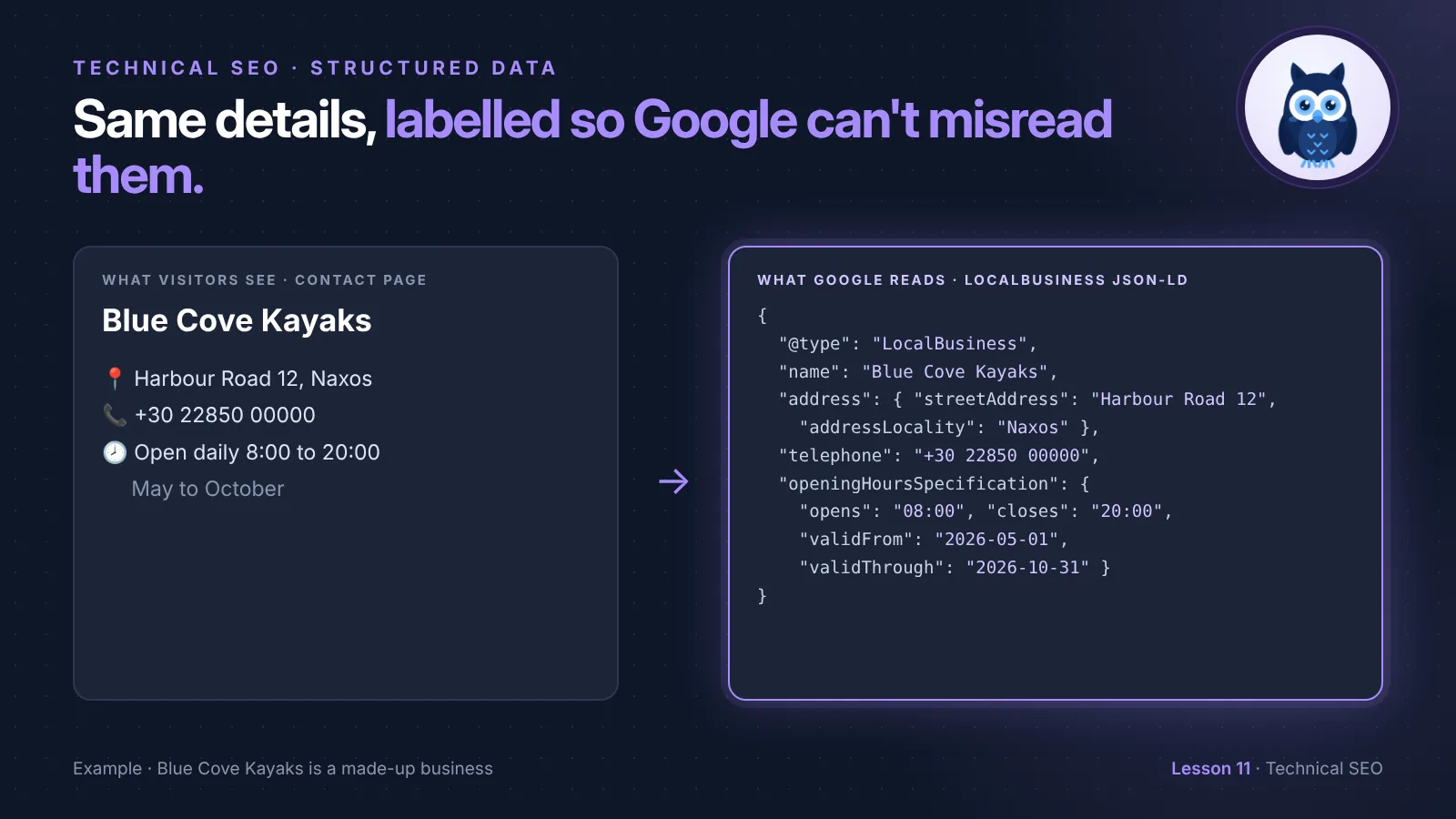
Here's the idea. On Blue Cove's Contact page, a visitor sees:
Blue Cove Kayaks · Harbour Road 12, Naxos · Open daily 8:00 to 20:00, May to October
Structured data says the same thing, but labelled:
- Type of thing: a local business
- Name: Blue Cove Kayaks
- Address: Harbour Road 12, Naxos, Greece
- Opening hours: every day, 08:00 to 20:00, from 1 May to 31 October
Visitors never see it. It sits in the page's code, just for search engines.
What it can do, and what it can't
- It helps Google understand your page. Your business details, your products, your events: no guessing.
- It can make you eligible for rich results. These are search results with extras, like star ratings, prices, event dates or a breadcrumb trail instead of a plain address. Google calls them rich results.
- It doesn't guarantee them. Google decides whether to show a rich result, page by page.
- It doesn't push you up the rankings on its own. Google says structured data isn't a general ranking boost. The benefit is a clearer, more useful result, which can mean more clicks.
🦉 Quick check
Blue Cove adds structured data to its sunset tour page. What can they expect?
- A) The page moves up to number one
- B) Google understands the page better, and it may show extra details in results, but nothing is guaranteed
- C) Visitors see a new box on the page
Show the answerHide the answer
B) Structured data makes a page clearer to Google and eligible for rich results. It's not a ranking shortcut, and visitors don't see it on the page.
Which types are worth it for a small business
There are hundreds of types on schema.org. Google only uses some of them for rich results, and a small business needs only a few:
| Type | Put it on | Worth it? |
|---|---|---|
| LocalBusiness | Homepage or Contact page | ✅ Yes, if customers visit you or you serve a local area |
| Organization | Homepage | ✅ Yes, it tells Google your official name, logo and website |
| BreadcrumbList | Every page | ✅ Often added by your site builder or SEO plugin already |
| Product | Product pages | ✅ If you sell products online, with prices |
| Event | Pages for real one-off events | ✅ Only for events with a date, like a festival or a workshop |
| Review snippet | Pages reviewing someone else's product or service | ⚠️ Not for reviews of your own business on your own site |
| FAQ | FAQ pages | ⚠️ Fine to have, but since August 2023 Google only shows FAQ rich results for well-known government and health websites |
Start with LocalBusiness if you have a physical location or serve a local area. It's the one Blue Cove picked.
Scout's mistake: "I run guided walks every morning. I marked each one up as an Event so they'd show up with dates in Google. They never did, and I'd broken Google's rules without knowing it." Google's Event markup is for real events, like a concert or a one-day workshop. A tour or class that runs every day is a service you sell, not an event. Describe it in words on the page, and use LocalBusiness for the business behind it.
How Blue Cove added LocalBusiness markup
The format Google recommends is called JSON-LD. It's a block of text inside a <script> tag, and it can go anywhere in the page's code. Here's Blue Cove's, on the Contact page:
<script type="application/ld+json">
{
  "@context": "https://schema.org",
  "@type": "LocalBusiness",
  "name": "Blue Cove Kayaks",
  "url": "https://bluecove-kayaks.example/",
  "telephone": "+30 22850 00000",
  "image": "https://bluecove-kayaks.example/media/sunset-kayak-tour-naxos.webp",
  "address": {
    "@type": "PostalAddress",
    "streetAddress": "Harbour Road 12",
    "addressLocality": "Naxos",
    "postalCode": "843 00",
    "addressCountry": "GR"
  },
  "openingHoursSpecification": {
    "@type": "OpeningHoursSpecification",
    "dayOfWeek": ["Monday", "Tuesday", "Wednesday", "Thursday", "Friday", "Saturday", "Sunday"],
    "opens": "08:00",
    "closes": "20:00",
    "validFrom": "2026-05-01",
    "validThrough": "2026-10-31"
  }
}
</script>
You don't need to understand every bracket. Here's what the parts mean:
"@context": "https://schema.org"says "these labels come from the schema.org dictionary"."@type": "LocalBusiness"says what the page is describing.name,url,telephoneandimageare the business's basic details.addressis the street address, split into labelled parts.openingHoursSpecificationgives the hours, andvalidFromandvalidThroughsay they only apply in the season. (The phone number and street are made up, like Blue Cove.)
No code needed. Blue Cove didn't type this. They used the free Schema generator: choose Local business, fill in the boxes, and copy the code. Then they pasted it into their website builder's custom code box for the Contact page. Most builders have one, sometimes called "Code injection" or "Header code". On WordPress, many SEO plugins add LocalBusiness markup from a settings form.
🦉 Spot the mistake
Blue Cove's structured data says "telephone": "+30 22850 00000". The footer on the page shows a different number, the new mobile number they switched to last spring. What's the problem?
- A) Nothing. Visitors don't see structured data
- B) The structured data doesn't match the page. Google's rule is that it must describe what's actually on the page, so update it
Show the answerHide the answer
B) It must match the page. Structured data has to describe the content visitors can see. Out-of-date markup gives Google the wrong answer, and markup that contradicts the page may be ignored. Every time you change your hours, phone or address, update the structured data too.
The one big rule: keep it true
Google can ignore structured data, or take action against it, if it breaks its guidelines. For a small business, it comes down to three things:
- Only describe what's on the page. If the hours are in your structured data, they should be on the page too, in words a visitor can read.
- Keep it up to date. New phone number, new hours, new address: update the markup the same day.
- No reviews of yourself. Don't add star-rating markup to your own business's pages based on reviews you collected yourself. Google doesn't show those stars for a business reviewing itself. Your Google reviews show on your Business Profile instead.
How to test your structured data
Do this after you add or change any markup:
- Run the Rich Results Test. Paste your page address into Google's Rich Results Test. It shows which types it found, and any errors (must fix) or warnings (nice to fix).
- Check the live page. Run the free SEO audit on the page. It checks that the code is really on the live page, not just in your builder's preview.
- Watch Search Console. Over the next weeks, look under Enhancements (or Shopping for products) for reports on the types Google supports. Not every type gets a report.
Blue Cove's test showed one valid LocalBusiness item and no errors. Then they opened their Google Business Profile and set the same seasonal hours there, so the website and the profile finally said the same thing.
Structured data vs your Google Business Profile
If you're a local business, your Google Business Profile matters more for showing up on Google Maps and in the local results than any code on your site. Structured data is the website half of the same story: it makes sure your site says the same thing as your profile. Keep the name, address, phone and hours identical in both. The Local SEO series covers your Business Profile in detail.
🔎 From my own audits: For a small business, the first structured data I add is the contact details and address, as LocalBusiness markup. It's the information customers look for most, so it's the most important to get right.
Must do vs go deeper
✅ Must do (about 20 minutes)
- Check what you already have: run your homepage through the Rich Results Test. Your site builder may already add some types
- If you serve customers locally, add LocalBusiness markup to your homepage or Contact page with the Schema generator
- Test it, and fix any errors
- Make sure every detail in it is also visible on the page
🔍 Go deeper (optional)
- Add Organization markup with your logo on the homepage, if your builder doesn't already
- If you sell products online, check your product pages have Product markup with price and availability. Most shop platforms add it for you
- Check Enhancements in Search Console for errors, once a month
- Put a note in your calendar: whenever you change your opening hours, update the markup too
🦉 What would you do?
Blue Cove's web designer offers to add FAQ markup to the sunset tour page's questions, "so we get those dropdowns in Google". What do you tell them?
- A) Great, that guarantees the dropdowns
- B) It's fine to add, but Google only shows FAQ rich results for well-known government and health sites now, so don't expect the dropdowns. LocalBusiness markup is the better use of the time
- C) FAQ markup is banned
Show the answerHide the answer
B) FAQ markup isn't against the rules, and other search engines may still use it. But since August 2023, Google shows FAQ rich results only for well-known government and health websites. For Blue Cove, getting their business details right is worth more.
Quick recap
- Structured data is code that labels what's on your page, using the schema.org dictionary. Google recommends the JSON-LD format.
- It helps Google understand your page and can make it eligible for rich results. It isn't a ranking shortcut, and rich results aren't guaranteed.
- For a small business, start with LocalBusiness and Organization. Use Event only for real events, and don't mark up reviews of yourself.
- Everything in the markup must be visible on the page and up to date.
- Test with the Rich Results Test, then check the live page with the SEO audit.
Your task (20 minutes): Run your homepage through the Rich Results Test. If you're a local business without LocalBusiness markup, create it with the Schema generator, add it, and test it.
Lesson 11 of 11 done 🎉
The guide for the Technical SEO series: the full checklist, free by email.
More lessons are on the way. Next in the series: canonical tags, and how to tell Google which version of a page is the main one. Until then, catch up on any lessons you skipped on the series page.
Want to check your structured data on the live page? Run the free SEO audit.
Sources and further reading
- Introduction to structured data markup in Google Search (Google Search Central)
- General structured data guidelines (Google Search Central)
- Local business structured data (Google Search Central)
- Search gallery: structured data Google supports (Google Search Central)
- Changes to HowTo and FAQ rich results (Google Search Central Blog, August 2023)
- Rich Results Test (Google)
- Schema.org LocalBusiness (schema.org)