Something feels off with your website. Traffic is flat, a page you love never shows up, and you're not sure where to start. That's what an SEO audit is for. This lesson shows you how to do an SEO audit the calm way: get ready first, then check.
An SEO audit is a health check for your website. You look at whether Google can find your pages, understand them and show them to the right people. Then you fix what matters most. This is lesson 1 of The SEO Audit Playbook, a free 6-lesson series for beginners and anyone who wants a repeatable routine.
Today's job is short: one goal, a list of pages, a free toolkit, and your starting numbers. About 30 minutes, and no code needed.
New here? Every lesson works on its own. You can see all 6 lessons on the series page, and get the free SEO Audit Workbook that goes with them here.
🦉 Remember from SEO for Beginners?
Google handles every page in four steps: crawl, render, index, rank. Which step must a page pass before it can show up in search results?
- A) Crawl
- B) Render
- C) Index
Show the answerHide the answer
C) Index. Google has to save (index) a page before it can show it to anyone. An SEO audit checks every step, starting with that one in lesson 2. New to these words? How search engines work explains them in plain language.
How to do an SEO audit: the big picture
An SEO audit is not a 90-page report full of red warnings. It's a short list of answers to three questions:
- Can Google find and save my pages? (lesson 2)
- Is every page clear and aimed at the right search? (lesson 3)
- Is the site fast, mobile-friendly and trusted? (lesson 4)
Then you turn the answers into a plan (lesson 5) and repeat the checks on a schedule (lesson 6).
If you're brand new, start with the lighter first SEO checkup from SEO for Beginners. This Playbook goes further, and it's built so you can repeat it every year.
Meet Blue Cove Kayaks, a year later
Throughout this series we follow Blue Cove Kayaks (bluecove-kayaks.example), a family-run sea-kayaking tour company on Naxos. Blue Cove is made up. Its problems are real ones most small sites run into, but its story and numbers are examples, not real results.
If you followed SEO for Beginners, you watched Blue Cove get its sunset tour page onto Google. A year later, the business has grown. It now has:
- a blog
- pages in three languages: English, German (
/de/) and French (/fr/) - an online booking system at
book.bluecove-kayaks.example
Bookings from Google feel slower than last summer, and the family keeps saying "something is off". Nobody can say what. So before anyone touches the website, they get ready.
Step 1: Set one goal
"Better SEO" isn't a goal. You can't tell when you've reached it. Pick one result that matters to your business, and write it in one sentence:
- Blue Cove: "More tour bookings from people who find us on Google."
- A local bakery: "More people finding our opening hours and calling to order cakes."
- A blogger: "More readers landing on my recipe pages."
Your goal decides which pages you check first and which problems you fix first. Write it on the Start here tab of the workbook.
Step 2: Choose which pages to audit
Your first SEO audit doesn't need to cover every page. Pick the 10 to 20 pages that matter most for your goal:
- your homepage
- pages that make money or bring leads (services, products, tours, contact)
- your top pages by clicks in Search Console (more on that below)
- any page you know has a problem
Blue Cove picked 18 pages: the homepage, the Tours page, each tour page in English, the German and French versions of the sunset tour, the booking page and their three most-read blog posts.
Scout's mistake: "On my first audit I checked all 400 pages of my site. Two weeks later I was still checking, and I hadn't fixed a single thing." Start small. A short list you finish beats a long one you abandon. You can add more pages next time.
🦉 Quick check
It's your first SEO audit. What should you check?
- A) Every page on the site, so nothing is missed
- B) The 10 to 20 pages that matter most for your goal
- C) Only the homepage
Show the answerHide the answer
B) The 10 to 20 pages that matter most. You'll actually finish, and you'll fix the problems that cost you the most. Checking every page comes later, with a crawler (see "Go deeper" below).
Step 3: Gather your free SEO audit tools
You don't need paid software for this series. Here's the full toolkit:
| Tool | What it's for in this series | Cost |
|---|---|---|
| Google Search Console | Google's own data about your site: indexing, clicks, speed, problems | Free |
| PageSpeed Insights | How fast one page loads, for real visitors and in a test | Free |
| SEO Audit | A quick scan of a page for common problems, like a forgotten noindex | Free |
| Robots.txt tester | Checks that your robots.txt file isn't blocking important pages | Free |
| Title length checker | Checks your page titles | Free |
| Heading outline viewer | Shows a page's headings at a glance | Free |
| Open Graph preview | Shows how a page looks when it's shared on social media | Free |
| SEO Audit Workbook | Where you record every check, issue and number | Free download |
The one tool you can't skip is Google Search Console. If you haven't set it up yet, lesson 2 of SEO for Beginners walks you through it in a few minutes.
Which kind of Search Console property do you have?
When you add a site to Search Console, you choose one of two property types. This matters more than it seems:
| Property type | What it covers | How you verify |
|---|---|---|
| Domain | Your whole domain: www and non-www, http and https, and every subdomain |
A DNS record at your domain provider |
| URL prefix | Only addresses that start with exactly what you typed, e.g. https://bluecove-kayaks.example/ |
Several easy options, like a meta tag |
Blue Cove set up a URL prefix property last year. That was fine then. But their new booking system lives on a subdomain, book.bluecove-kayaks.example, and a URL prefix property doesn't include subdomains. So Search Console has been showing them only part of the picture.
The fix is to add a Domain property too. You keep the old one, and its history stays where it is.
The code way. Search Console gives you a line of text to add to your domain's DNS settings, as a "TXT record". It looks like this:
google-site-verification=abc123yourcodehere
google-site-verification=tells Google this record is for Search Console.abc123yourcodehereis your own code. Search Console shows it to you; copy it exactly.
You paste it as a new TXT record wherever you manage your domain (the company you bought the domain from, or your website host). Then click Verify in Search Console. DNS changes can take a while to show up, so if it fails, try again later.
No code needed. For many popular domain providers, Search Console offers to add the record for you after you sign in to your provider. If you can't access your DNS at all, stay with a URL prefix property and add a separate URL prefix property for each subdomain you use.
Step 4: Write down your starting numbers
This is the step people skip, and regret. Before you fix anything, record where you're starting. Then, in a few weeks, you can see what actually helped.
Open Search Console and copy these into the Baseline tab of your SEO audit workbook:
- Performance → Search results, last 3 months: total clicks, impressions, average CTR (the share of people who saw your page in Google and clicked) and average position.
- Indexing → Pages: how many pages are indexed, and how many are not indexed.
- Experience → Core Web Vitals: on mobile, how many URLs are Good, Need improvement and Poor. (Small sites may see "not enough data". Write that down too.)
- The date range and the date you recorded them.
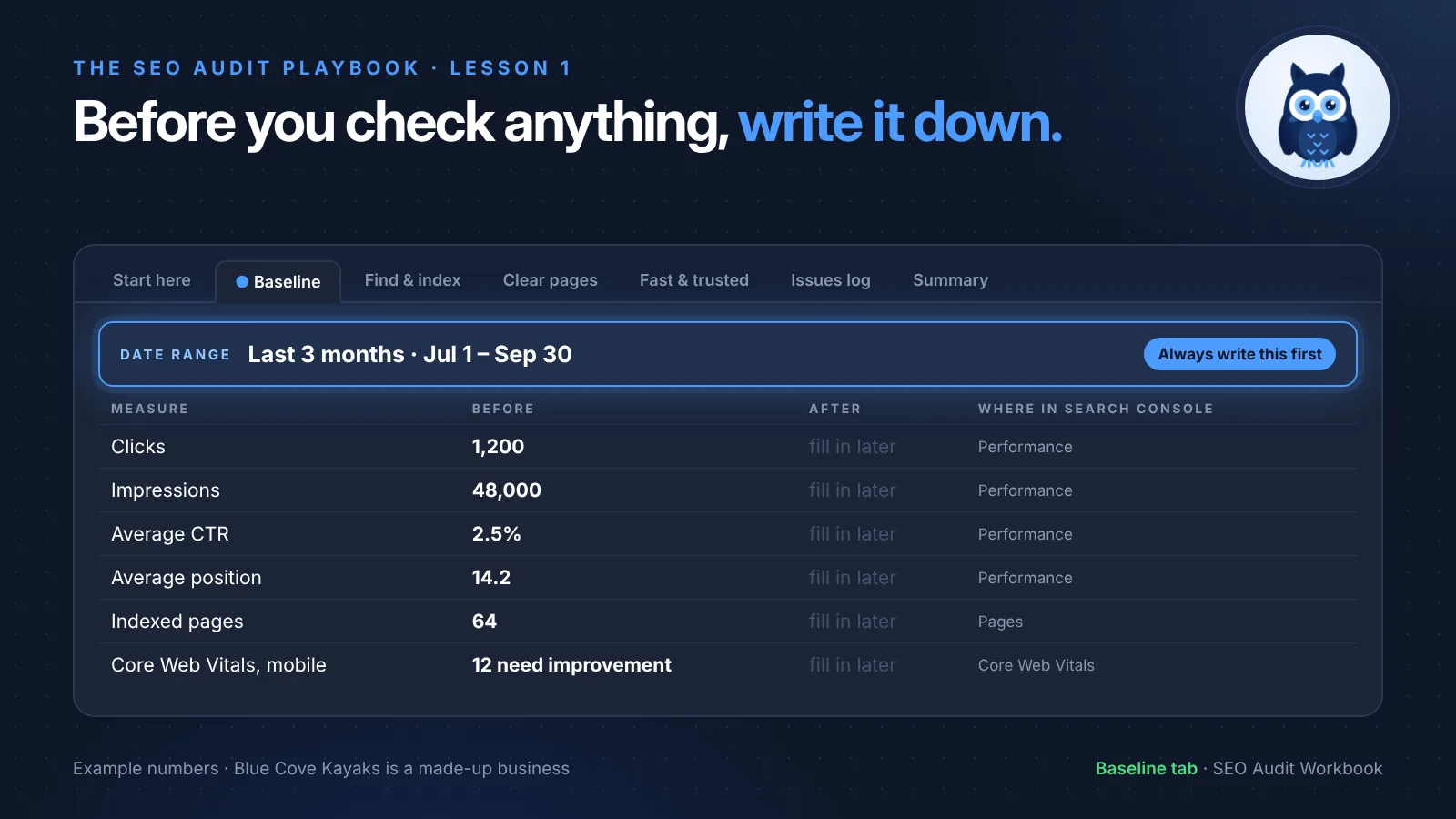
The Baseline tab has a Before column for today and an After column you'll fill in later (in lesson 6).
Scout's mistake: "I wrote 'Clicks: 1,200' and nothing else. Two months later I couldn't remember if that was one month or three." Always write the date range next to a number. "1,200 clicks" means nothing without it.
🦉 Spot the mistake
Blue Cove's first Baseline row reads: Clicks: 1,200 · Impressions: 48,000 · Position: 14.2. What's missing? (These are made-up numbers.)
- A) The number of pages
- B) The date range the numbers cover
- C) Nothing, it's complete
Show the answerHide the answer
B) The date range. Without it, you can't compare fairly later. Three months of clicks and one month of clicks look very different. For a seasonal business like Blue Cove, the time of year matters too.
Step 5: Download the workbook and fill in "Start here"
Every lesson in this series uses one workbook with named tabs. You'll never need to hunt for a page number. Get the free SEO Audit Workbook (Google Sheets or Excel) and open the Start here tab. Fill in:
- Site: your website's address
- Date: today
- Goal: your one sentence from step 1
- Scope: your 10 to 20 pages from step 2
- Tools: which property type you use in Search Console, and any other tools
There's also a filled-in Blue Cove sample version, so you can see what a finished workbook looks like.
Only have an hour? Do these 10 checks
Short on time? These 10 checks catch the most common problems. Each one links to the lesson that explains it.
- Your site shows up for a
site:search on Google (lesson 2) - Search Console's Pages report shows your key pages as indexed (lesson 2)
- No key page has a noindex (lesson 2)
- robots.txt doesn't block key pages (lesson 2)
- Your sitemap is submitted and shows "Success" (lesson 2)
- Every key page has a unique, clear title (lesson 3)
- Each page has one H1, and the heading outline makes sense (lesson 3)
- No two key pages aim for the same main keyword (lesson 3)
- The Core Web Vitals report shows no "Poor" URLs on mobile (lesson 4)
- Manual actions and Security issues in Search Console are both clear (lesson 4)
The full list, with a link for each check, is on the series page.
Must do vs go deeper
Every lesson in this series has two levels, so it never gets overwhelming.
✅ Must do (about 30 minutes)
- Search Console is set up for your site
- Write your one goal
- Pick your 10 to 20 key pages
- Fill in the Start here tab
- Copy your last 3 months of clicks, impressions, CTR and position into Baseline, with the date range
🔍 Go deeper (optional)
- Add a Domain property if you only have URL prefix
- Note your top 10 queries and top 10 pages in Baseline (Performance report, Queries and Pages tabs)
- Compare the last 3 months with the same months last year, using the date filter's Compare option. This matters for seasonal businesses.
- Crawl your whole site with a free crawler, such as Screaming Frog SEO Spider. Its free version crawls up to 500 URLs, which is plenty for most small sites.
🦉 What would you do?
Your website is on a URL prefix property in Search Console. Your online shop runs on a subdomain, shop.yoursite.com. You want to see the shop's clicks too. What do you do?
- A) Nothing. The shop is already included
- B) Add a Domain property (or a URL prefix property for the shop)
- C) Move the shop to a new domain
Show the answerHide the answer
B) Add a Domain property. A URL prefix property only covers addresses that start with exactly what you typed, so subdomains are left out. A Domain property covers them all. If you can't edit your DNS, add a separate URL prefix property for the subdomain.
Quick recap
- How to do an SEO audit starts before the first check: one goal, a short list of pages, free tools, starting numbers.
- Audit the 10 to 20 pages that matter most, not the whole site.
- Google Search Console is the one tool you can't skip. A Domain property shows your whole site, including subdomains.
- Write down your Baseline numbers, always with a date range.
- Everything goes in one workbook: today you used Start here and Baseline.
Your task (30 minutes): Fill in the Start here and Baseline tabs for your site.
Lesson 1 of 6 done 🎉
The guide for the SEO Audit Playbook series: the full checklist, free by email.
Next up, lesson 2: Can Google find and index your site? Blue Cove's new booking calendar has a secret: Google is spending its visits on hundreds of empty date pages, while their German tour pages wait to be found. You'll learn how to check that Google can reach and save every page that matters.
Sources and further reading
- Add a website property to Search Console (Search Console Help)
- Verify your site ownership (Search Console Help)
- Performance report (Search results) (Search Console Help)
- Search Engine Optimization (SEO) Starter Guide (Google Search Central)
- Understanding Core Web Vitals and Google search results (Google Search Central)