In lesson 3, Blue Cove Kayaks found the words tourists actually type. They gave every important page a main keyword and started to see their tour page appear in Google.
But one page still wouldn't move. Their blog post "Why we love kayaking" was supposed to rank for "book kayak tour naxos". It had the keyword in the title, in the headings, everywhere. It never showed up.
The keyword wasn't the problem. The type of page was. This lesson is about matching each search to the right kind of page, with plenty of search intent examples, and about making sure your own pages don't compete with each other.
🦉 Remember from lesson 3?
Long-tail keywords like "sunset kayak tour naxos" usually get…
- A) More searches than broad keywords like "kayak"
- B) Fewer searches, but from people who know exactly what they want
Show the answerHide the answer
B) Fewer searches, but the right people. That's why they're a small site's sweet spot. Today's lesson adds one more question to ask about every keyword: what kind of page are those people hoping to find?
Same words, different goals
Every search has a goal behind it. SEO people call this search intent: what the person is actually trying to do.
Look at these four searches. They're all about kayaking in Naxos, but each person wants something completely different:
| Search | What the person wants | Type of intent |
|---|---|---|
| is sea kayaking safe for beginners | An answer to a question | Learn |
| best kayak tours naxos | To compare options before choosing | Compare |
| book sunset kayak tour naxos | To book, right now | Book or buy |
| blue cove kayaks | To find one specific website | Go to a site |
Those are the four main types of search intent. You don't need to memorise the names. Just get into the habit of asking: what is this person trying to do?
Want the theory behind it? Read Search intent in plain language.
🦉 Quick check
Someone searches "what to wear for sea kayaking". What do they want?
- A) To book a tour
- B) An answer to a question
- C) To visit one specific website
Show the answerHide the answer
B) An answer to a question. It's a learn search. The best page for it is a helpful article or guide, maybe with a short packing list, and a link to your tours at the end for readers who are ready to book.
Google already tells you what it wants
Here's the good news: you don't have to guess the intent behind a search. Google shows you. It has already worked out which kind of page people prefer for each search, and it puts those pages at the top.
So before you decide which page should target a keyword, do the 2-minute intent check:
- Google the keyword. Use a private/incognito window, so the results are less tailored to you.
- Look at the top 5 results and note what type of page they are. Booking or product pages? Articles and guides? "Best of" lists? A map with local businesses?
- Look at the extras. A "People also ask" box often means people want answers. A map means they want somewhere nearby. Lots of videos means they want to see how it's done.
- Compare with your page. Is your page the same type as most of the top results?
If yes, great. If not, your page will struggle, however good it is.
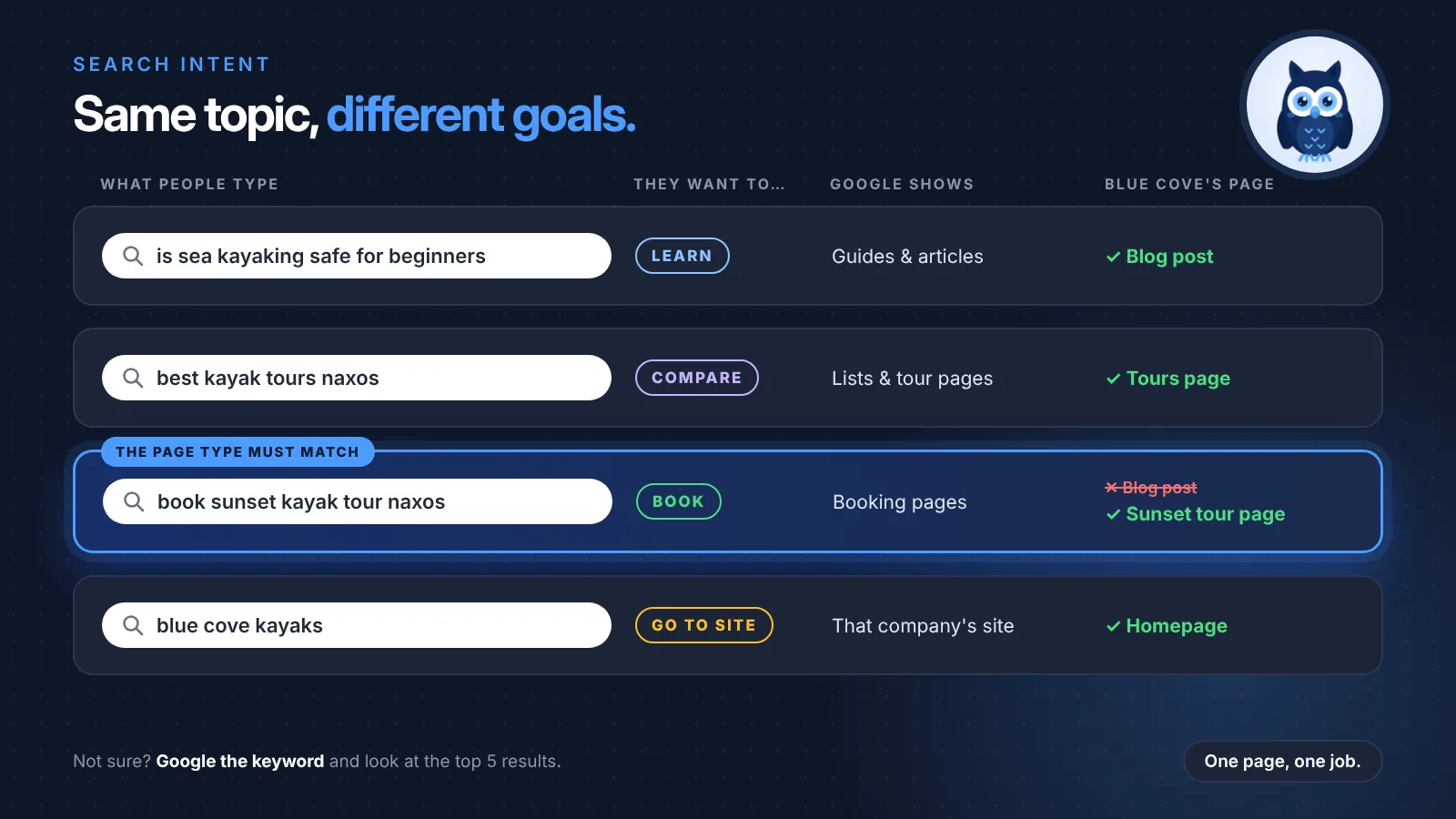
Blue Cove's mistake (and the fix)
When Blue Cove did the 2-minute check for "book kayak tour naxos", the answer was obvious. Every result at the top was a booking page: tour companies' own booking pages and big activity-booking websites. Not a single blog post.
Google had decided that people typing "book" want to book. A blog post about why kayaking is lovely, however well written, isn't what they're looking for.
So Blue Cove made two changes:
- The booking keyword went to the page that actually takes bookings, the Sunset kayak tour page.
- The blog post got a new job. In lesson 3, they'd found the question "Is sea kayaking safe for beginners?" in Google's "People also ask" box. They rewrote the post to answer exactly that.
Before:
Why we love kayaking · targeting "book kayak tour naxos"
After:
Is sea kayaking safe for beginners? An honest answer from Naxos guides · targeting "is sea kayaking safe for beginners"
The rewritten post answers the question properly (calm bays, life jackets, what happens if you tip over, which tours suit first-timers), then links to the Beginners' tour at the end. Now each page has one job, and it's the job Google expects for that search.
Scout's mistake: "I wrote a blog post for every keyword, including the ones with 'book' and 'price' in them." Blog posts are great for learn searches. For book and buy searches, Google almost always shows booking or product pages. Write the post, but aim it at a question.
🦉 Quick check
You Google "kayaking naxos" and the top results are all tour and booking pages. Which Blue Cove page should target this keyword?
- A) A blog post about kayaking in Naxos
- B) The Tours page that lists all their tours
Show the answerHide the answer
B) The Tours page. Google is showing tour and booking pages, so that's the type of page people want for this search. Their blog post would be up against pages of a completely different kind.
Blue Cove's intent map
Remember the keyword map from lesson 3? Blue Cove added one column to it: what Google shows. It takes 2 minutes per keyword, and it stops you building the wrong page. Here are their search intent examples, side by side:
| Search | What Google shows | Blue Cove page |
|---|---|---|
| sunset kayak tour naxos | Tour and booking pages | Sunset kayak tour page |
| kayaking naxos | Tour pages and lists | Tours page |
| is sea kayaking safe for beginners | Guides and articles | Blog post |
| best beaches in naxos | Lists and travel guides | Blog post: beaches you can only reach by kayak |
| kayak rental near me | A map with local businesses | Google Business Profile (covered in the Local SEO series) |
That last row is interesting. When Google shows a map, the winners are usually businesses with a complete Google Business Profile, not a page on their website. Different search, different "page".
When your own pages compete with each other
There's a second way to get the type of page wrong: having two pages that try to do the same job.
Blue Cove had this problem too. Years ago they'd made a page called "Evening kayak tour". Later they made the "Sunset kayak tour" page. Same tour, same time of day, almost the same text, and both targeting "sunset kayak tour naxos".
When two of your pages target the same search, Google has to choose between them. It might pick the weaker one, or switch back and forth, and the effort you put into each page gets split in two. SEO people call this keyword cannibalization: your pages eating each other's chances.
How to spot it
- Search Google for
site:yourdomain.com keyword, for examplesite:bluecove-kayaks.example sunset kayak tour. If several of your pages come up for the same idea, take a closer look. - In Search Console, open Performance, click a query, then open the Pages tab. If two or more of your pages appear for the same search, they may be competing.
How to fix it
You have two options:
1. Merge them. If the pages really do the same job, keep the stronger one, move any useful text from the other into it, and redirect the old address to the one you're keeping. A 301 redirect tells Google and visitors: "this page has moved permanently, go here instead."
Most website builders and SEO plugins have a Redirects setting where you just enter the old and new address. If your site uses an Apache server, a redirect can also be one line in a file called .htaccess:
Redirect 301 /tours/evening-kayak-tour /tours/sunset-kayak-tour
Redirect 301means "moved permanently".- The first address is the old page, and the second is where it should go now.
2. Give each page a different job. If the pages really are different, make that clear: different keywords, different titles, different content. If Blue Cove's evening tour had included dinner on the beach, it could target "kayak tour with dinner naxos" instead.
Blue Cove merged them. The Evening tour page now redirects to the Sunset tour page, which became stronger.
Scout's mistake: "I made two pages about the same thing, so I'd have double the chances." It works the other way round. Two half-strong pages usually lose to one strong page, yours or someone else's.
🦉 Spot the mistake
Here's part of Blue Cove's old site. What's the problem?
| Page | Title | Main keyword |
|---|---|---|
| /tours/sunset-kayak-tour | Sunset Kayak Tour in Naxos | sunset kayak tour naxos |
| /tours/evening-kayak-tour | Evening Sunset Kayak Tour, Naxos | sunset kayak tour naxos |
Show the answerHide the answer
Two pages are doing the same job. Same tour, same keyword, almost the same title, so they compete with each other. Merge them into one strong page and 301-redirect the old address. Or, if they're genuinely different tours, give each its own keyword and a clearly different title.
What happened to Blue Cove?
After this lesson, every Blue Cove page had one clear job:
- The Sunset tour page targets the booking searches.
- The Tours page targets broader searches like "kayaking naxos".
- The blog answers questions people actually ask, and links to the right tour at the end.
- The old Evening tour page redirects to the Sunset tour page.
The rewritten beginners' post started appearing for "is sea kayaking safe for beginners", and readers began clicking through to the Beginners' tour.
🦉 What would you do?
Blue Cove's older blog post "Our favourite sunset spots" and their Sunset tour page both target "sunset kayak tour naxos". The blog post gets a few visitors and has some nice photos. What's the best move?
- A) Delete the blog post
- B) Give the blog post a different job, e.g. "best sunset spots in naxos", and link it to the tour page
- C) Leave both as they are
Show the answerHide the answer
B) Give it a different job. The post has value (visitors, photos), so don't throw it away. Aim it at a learn search that fits it, like "best sunset spots in naxos", and add a link to the Sunset tour for readers who want to see it from the water. Now the two pages help each other instead of competing.
Quick recap
- Search intent is what someone is trying to do: learn, compare, book or buy, or go to a specific site.
- Google shows you the intent. Look at the top results before you decide which page targets a keyword.
- Match the page type: booking searches need booking pages, and questions need helpful articles.
- Don't let your pages compete. Merge them with a 301 redirect, or give each one a different job.
Your 15-minute task
- Take the keyword map from lesson 3 (or write down the main keyword of your 3 most important pages).
- Google each keyword and note what type of page wins at the top.
- Check your own page is the same type. If two of your pages share a keyword, decide: merge or a new job?
You finished lesson 4. 🎉 That's 4 of 8 done, halfway there!
Want every lesson of this series in one place? The SEO for Beginners Guide brings together all 8 lessons, every checklist (including the 2-minute intent check) and all the quick checks with answers, in one free PDF.
The guide for the SEO for Beginners series: the full checklist, free by email.
Next lesson
Every Blue Cove page now has the right job. But open the Sunset tour page and you'll find the title "Tours | Blue Cove", a heading that just says "Welcome!", and no price anywhere. In lesson 5, Writing a page both Google and people understand, we'll rewrite it from top to bottom.
Sources and further reading
- Creating helpful, reliable, people-first content (Google Search Central): what Google means by content that meets people's needs.
- Redirects and Google Search (Google Search Central): how 301 redirects work.
- SEO Starter Guide (Google Search Central): Google's own overview of the basics.