Your title, meta description and H1 bring people to the page. The words on the page decide whether they stay, and whether Google understands what you offer. This lesson shows you how to optimize page content for SEO in three steps: make sure Google can actually see your words, answer the questions visitors really ask, and use your keywords naturally.
No code needed for the main steps. You'll need about 30 minutes and one important page of your own.
New here? This is lesson 5 of the On-Page SEO series. It works on its own, so you can start right here.
🦉 Remember from last lesson?
What's the "only-line test" for an H1?
- A) The H1 must fit on one line
- B) Someone who sees only the H1 should know what the page is about
- C) The H1 must be the only heading on the page
Show the answerHide the answer
B) If the H1 alone tells people what the page is about, it passes. Today, the same idea goes one step further: the whole page should tell people, and Google, exactly what you offer.
Meet Blue Cove Kayaks
In this lesson we follow Blue Cove Kayaks (bluecove-kayaks.example), a family-run sea-kayaking tour company on Naxos. Blue Cove is made up. Its problems are real ones most small sites run into, but its story is an example, not real results.
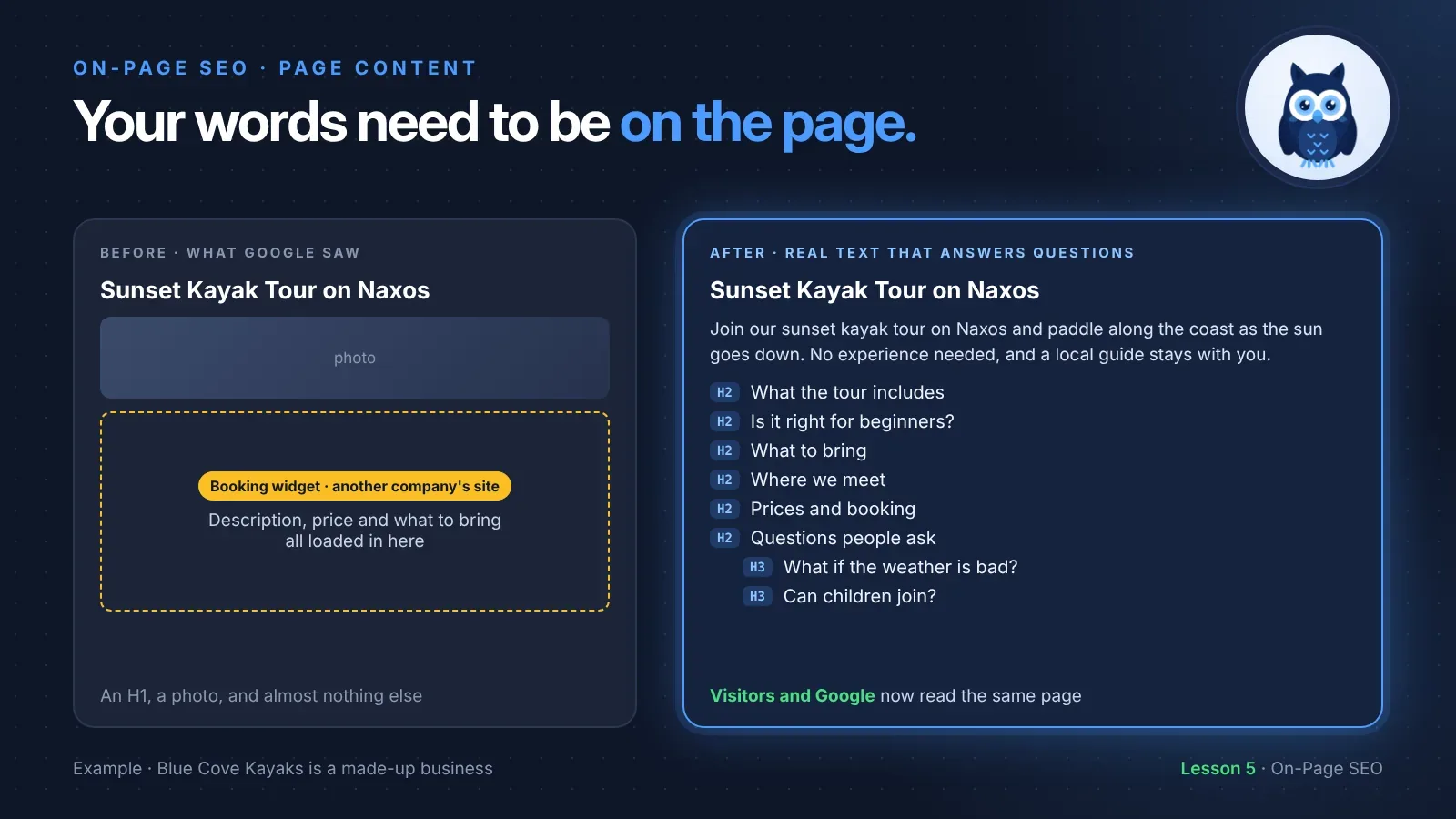
By now, Blue Cove's sunset tour page had a clear title, a good meta description and one H1. It looked great to visitors. Then they checked what Google saw. Under the H1 there was a photo and the booking widget, and almost nothing else. The tour description, the price and what to bring all loaded inside the booking widget, which came from the booking company's website. To Google, the page was nearly empty.
Step 1: Make sure Google can see your words
This is the step most people never check. Your visitors may see a full page, while Google sees much less. Common reasons:
- Text inside a booking, shop or review widget. It's often loaded from another company's website, so Google may not count it as part of your page.
- Text inside an image. A poster or banner with the price written on it is a picture to Google. It can't reliably read it as text.
- Text that only appears after a click, such as tabs that load new content from the server when opened.
How to check
The code way. Open your page, press Ctrl+U (or Cmd+Option+U on a Mac) to see its source code, then press Ctrl+F (Cmd+F) and search for a sentence from your main text. If you find it, the text is in the page. If you can't, it's probably loaded some other way, by JavaScript or from another site.
Here's roughly what Blue Cove found in the sunset tour page's code before the fix:
<h1>Sunset Kayak Tour on Naxos</h1>
<img src="/images/sunset-tour.jpg" alt="Kayakers paddling at sunset off Naxos">
<iframe src="https://booking-partner.example/widget/blue-cove"></iframe>
<h1>is the main heading. That part was fine.<img>is the photo, with its alt text.<iframe>is a window showing a page from another website, here the booking company's. Everything visitors read about the tour lived inside it, on someone else's site.
No code needed. In Google Search Console, paste the page's address into URL Inspection at the top, then choose View crawled page. It shows the HTML Google got. Search it for a sentence from your page.
How Blue Cove fixed it
They kept the booking widget for what it's good at, taking bookings. They moved the description, price, meeting point and "what to bring" into the page itself, as normal text above the widget. Now visitors and Google read the same thing.
Scout's mistake: "My café's whole menu was one beautiful photo. It looked great. But when people searched 'vegan breakfast' with my town's name, I never came up, even though half my menu is vegan." Write important words as real text. Keep the photo too, just not instead of the words.
🦉 Quick check
Blue Cove's sunset tour price is shown only inside the booking widget, which loads from the booking company's website. Can Google reliably count it as part of Blue Cove's page?
- A) Yes, if visitors can see it, Google can too
- B) Not reliably. Put the price in the page's own text as well
Show the answerHide the answer
B) Not reliably. Content loaded from another website may be treated as part of that website, not yours. Important details like the price belong in your page's own text.
Step 2: Answer what visitors actually ask
Once Google can see your words, make them the right words. The best content for a page answers the questions people have before they buy, book or call.
Blue Cove's easiest source was their own inbox. Over one summer, the same questions kept coming in by email and phone:
- How long does it take?
- Do I need any experience?
- What should I bring?
- Where do we meet, and can I park there?
- What happens if the weather is bad?
- Can children join?
Every one of those questions got an answer on the page, grouped into the sections you saw in lesson 3: what the tour includes, whether it's right for beginners, what to bring, where we meet, prices, and a few common questions. If people keep asking it, the page should answer it.
The last question taught Blue Cove something. Families kept asking about kids, but the website never mentioned children once. Families were a group they'd been missing. So the sunset tour page got a short answer ("The sunset tour suits ages 12 and up. For younger kids, try our family tour") with a link to the family tour page.
Other places to find visitors' questions:
- Questions customers ask you in person, by phone or in messages
- Your reviews: what do people praise, and what surprised them?
- Google's People also ask box when you search your main keyword
- Search Console: Performance → Search results → Queries shows what people searched before they found you
Want to go deeper into what searchers are really after? Search intent in plain language explains it step by step.
Step 3: Use your keywords naturally
Your main keyword is the phrase you want the page to be found for. Google doesn't need it repeated over and over. It understands related words, and it treats heavy repetition as spam. A few natural places are enough:
- The H1 (lesson 4)
- The first paragraph, which also helps if Google picks it for the snippet (lesson 2)
- One H2, if it fits, such as "Is the sunset kayak tour right for beginners?"
- An image's alt text, if it truly describes the image
- Related words throughout: for Blue Cove, that's sunset, paddle, sea kayak, guide, Naxos, bay, beginners
Here's the difference.
The first one says the keyword four times and nothing else. The second says it once, then answers three real questions: what it is, how long it takes, and whether you can do it.
🦉 Spot the mistake
Blue Cove's first try at a new "What to bring" section read:
"What to bring on your sunset kayak tour Naxos: for the best sunset kayak tour Naxos experience, bring what you need for a sunset kayak tour in Naxos."
What's wrong?
- A) It's too short
- B) It repeats the keyword three times and never says what to bring
- C) It should be in a list
Show the answerHide the answer
B) It's keyword stuffing, and it answers nothing. A useful version names the actual things: swimwear, a towel, a hat, sunscreen and a change of clothes. A list (C) would help too, once there's something real to list.
Make it easy to read
Most visitors skim, especially on a phone. Help them:
- Short paragraphs, two to four sentences each
- Lists for steps, items and options
- Specific details instead of vague words. "About two and a half hours" beats "a few hours". "Meet at the small harbor beach, five minutes' walk from the bus stop" beats "central location".
- Plain language. "Life jacket", not "personal flotation device".
- The most important answer first in each section
How long should the page be?
There's no magic word count. Google says the length of content alone doesn't matter for ranking. A page should be as long as it needs to be to answer its visitors' questions, and no longer. Blue Cove's sunset tour page ended up around 600 words, because that's what six good answers took.
🦉 Quick check
Someone tells Blue Cove that every page needs at least 1,500 words to rank. What's true?
- A) Yes, longer always ranks higher
- B) No. Length alone doesn't matter to Google. Answer visitors' questions fully, then stop
Show the answerHide the answer
B) Google says there's no word count target, minimum or maximum. Padding a page to hit a number makes it harder to read, and doesn't help it rank.
Show what only you know
Many websites can say "a beautiful sunset tour". Only Blue Cove can say which bay is calmest after 6 pm in August, or that their guide Nikos points out the old lighthouse on the way back. Google's guidance asks whether content offers original information and shows first-hand experience. Small, real details like these are what make your page more useful than the next one.
Look for:
- Tips from your own experience
- Your own photos, not stock images
- Real answers to the questions you get, in your own words
Must do vs go deeper
✅ Must do (about 30 minutes)
- Check one important page: can you find its main text in the page source, or in Search Console's View crawled page?
- Move any important text out of images and widgets into normal page text
- Write down the 5 questions customers ask most, and make sure the page answers each one
- Put your main keyword in the H1 and first paragraph, once each, naturally
- Read the page aloud. If a sentence sounds like it was written for a robot, rewrite it
🔍 Go deeper (optional)
- Check the People also ask box for your main keyword, and answer any good questions you're missing.
- In Search Console, look at the Queries for this page. Are people finding it with words the page never mentions? Add an answer if it fits.
- Check that two pages don't answer the same main question. If they do, they may compete with each other.
- Add a few first-hand details: a tip, a local fact, a real photo.
🦉 What would you do?
Blue Cove is short on time. Someone suggests copying the sunset tour's new description onto the family tour and private tour pages, changing only the tour name. What do you suggest?
- A) Do it. Same text, less work
- B) Write each page its own short description, answering the questions people ask about that tour
- C) Leave the other two pages empty
Show the answerHide the answer
B) Three near-identical pages are hard for people and Google to tell apart, and none of them answers the real questions. Families ask about ages and safety. Private tour customers ask about dates and group size. Even 150 honest words per page beats a copy.
Quick recap
- To optimize page content for SEO, first check that Google can see your words. Text inside widgets, iframes and images may not count as part of your page.
- Check with Ctrl+U and search, or URL Inspection → View crawled page in Search Console.
- Turn the questions visitors ask into sections that answer them.
- Use your main keyword naturally: H1, first paragraph, maybe one H2 and an alt text. Never stuff it.
- There's no magic word count. Answer fully, then stop.
Your task (30 minutes): Pick one important page. Check that its main text is in the page source, then add answers to the 3 questions your customers ask most.
Lesson 5 of 9 done 🎉
The guide for the On-Page SEO series: the full checklist, free by email.
Next up, lesson 6: SEO-friendly URLs, and what to do when one changes. Blue Cove once renamed its evening tour, changed the page's address, and later merged it into the sunset tour. Every one of those steps could have cost them visitors. You'll learn how to choose a good URL, and how to move a page without losing the people trying to reach it.
Want to check the rest of the page too? Run the free SEO audit.
Sources and further reading
- Creating helpful, reliable, people-first content (Google Search Central)
- SEO Starter Guide (Google Search Central), including what it says about word count
- Spam policies: keyword stuffing (Google Search Central)
- Understand the JavaScript SEO basics (Google Search Central)
- URL Inspection tool (Search Console Help)