Every page on your site has an address, its URL. A good one is short, easy to read, and tells people what they'll find before they click. But the most expensive URL mistakes don't happen when you choose one. They happen when you change one. This lesson shows you what makes SEO-friendly URLs, and how Blue Cove Kayaks moved and merged pages without losing the people trying to reach them.
No code needed. You'll need about 20 minutes and access to your website's settings.
New here? This is lesson 6 of the On-Page SEO series. It works on its own, so you can start right here.
🦉 Remember from last lesson?
Blue Cove's tour description loaded inside the booking widget. Why was that a problem?
- A) The widget was too slow
- B) The text came from another website, so Google might not count it as part of Blue Cove's page
- C) Visitors couldn't read it
Show the answerHide the answer
B) Visitors saw the text, but it lived on the booking company's site. Blue Cove moved it into the page itself. Today's lesson is about the page's address, and what happens when that address changes.
Meet Blue Cove Kayaks
In this lesson we follow Blue Cove Kayaks (bluecove-kayaks.example), a family-run sea-kayaking tour company on Naxos. Blue Cove is made up. Its problems are real ones most small sites run into, but its story is an example, not real results.
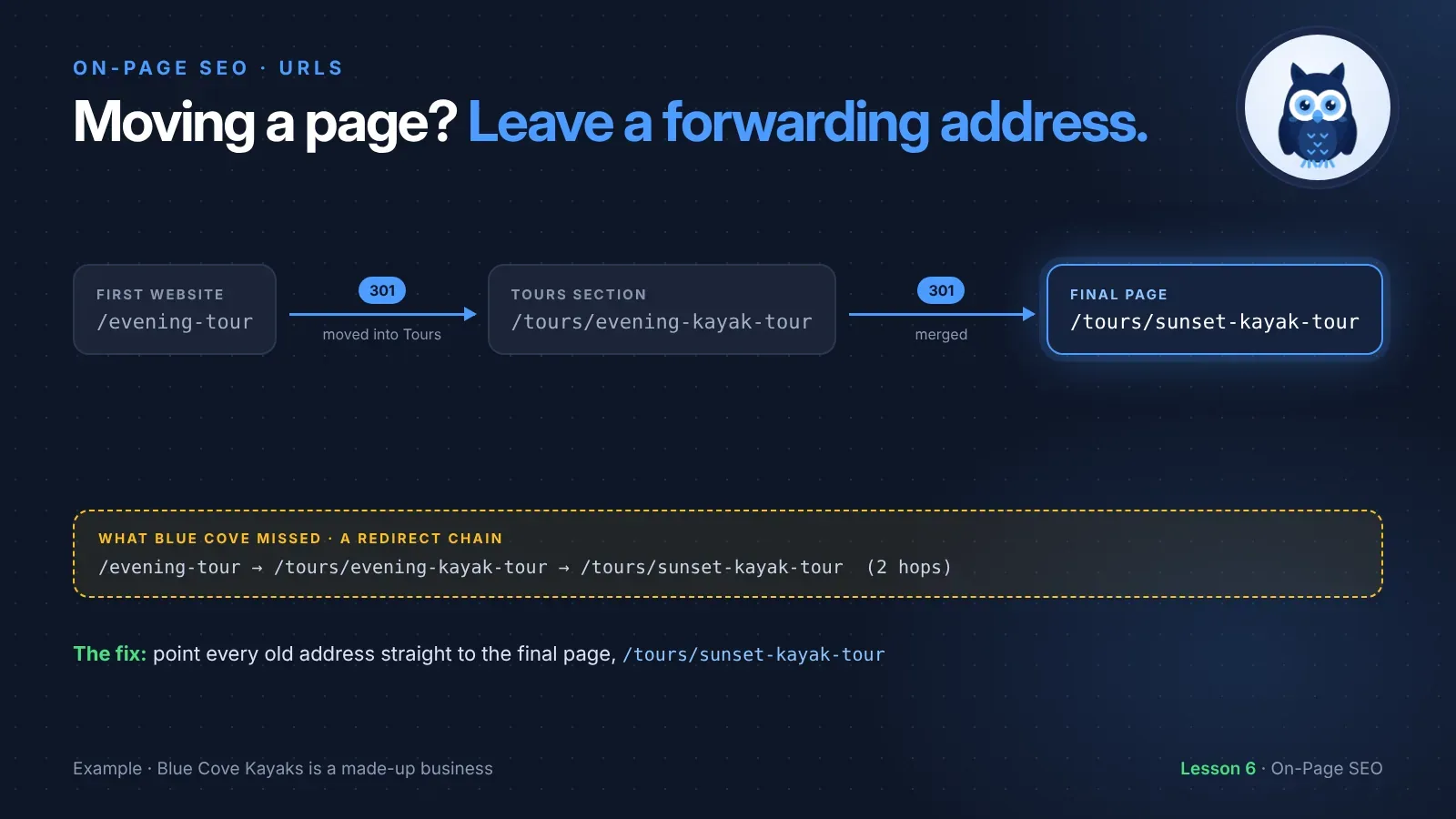
Blue Cove's first website was tiny. Every page sat right after the domain, like /evening-tour. As the business grew, they made a Tours section, so each tour moved to an address starting with /tours/. Later, they stopped running the evening tour as its own trip and folded it into the sunset tour.
That's two address changes for one page. A travel blog had linked to the old evening tour page, and people had bookmarked it. Every change risked sending them to an error page.
What makes a URL SEO-friendly
A URL is a page's full address. Here's one from Blue Cove, in three parts:
https://bluecove-kayaks.example/tours/sunset-kayak-tour
https://is how the browser connects. Thesmeans the connection is secure.bluecove-kayaks.exampleis the domain, the name of the whole website./tours/sunset-kayak-touris the path: a folder (tours) and the page's own name, often called the slug (sunset-kayak-tour).
You mostly choose the path. Here's what makes a good one:
- Readable words, not numbers. Google recommends readable words rather than long ID numbers.
/tours/sunset-kayak-tourbeats/page?id=1042. - Short and to the point. Leave out "and", "the", "our" and anything that doesn't help.
- Hyphens between words. Google recommends hyphens (
-) instead of underscores (_), because hyphens clearly separate the words. - Lowercase. To Google,
/Toursand/toursare two different addresses. Lowercase everywhere avoids accidental duplicates. - No dates, unless the date matters.
/blog/2025/06/is-sea-kayaking-safelooks old the moment the year ends, even if you keep the post up to date. - Folders that make sense. All tours under
/tours/, all blog posts under/blog/. People can see where they are. - The words people search for, if they fit naturally. The main keyword in the slug helps people see the page is what they want.
Do the words in a URL help you rank? A little at most. Their main job is helping people: in search results, in a shared link, or when someone reads the address before clicking. That's why you should never change a working URL just to add a keyword.
The first one tells nobody anything. The second says it's a tour, a kayak tour, and for families, before anyone clicks.
🦉 Quick check
Which slug is best for Blue Cove's private tour page?
- A)
/tours/Private_Kayak_Tour - B)
/tours/private-kayak-tour - C)
/tours/our-amazing-private-kayaking-tour-on-the-beautiful-island-of-naxos-2025
Show the answerHide the answer
B) Lowercase, hyphens and only the words that matter. A uses capitals and underscores. C is long, has filler words and a year that will soon look out of date.
When a URL has to change
Sometimes you need to change a URL: you rename a service, tidy up your folders, or merge two pages. That's fine, if you leave a forwarding address.
That forwarding address is a 301 redirect. It tells browsers and Google: "this page has moved for good, go here instead." Anyone who clicks an old link, opens an old bookmark or finds the old address in Google lands on the new page. Google says permanent redirects like this don't make you lose the value the old page had built up.
Without a redirect, the old address shows a 404 error ("page not found"). Visitors leave, and links from other websites now point at nothing.
Blue Cove's two changes
Change 1: moving the page into the Tours section.
/evening-tour → /tours/evening-kayak-tour
The tour was the same. Only its address changed. A 301 redirect sent everyone from the old address to the new one.
Change 2: merging the evening tour into the sunset tour.
/tours/evening-kayak-tour → /tours/sunset-kayak-tour
The evening tour and the sunset tour went out at almost the same time of day, so Blue Cove made them one tour. They redirected the old evening tour page to the sunset tour, the page closest to what people were looking for. They also moved the best of the evening tour's text and photos onto the sunset tour page, so visitors found what they expected.
Scout's mistake: "When I closed my old product range, I redirected every old page to my homepage. It felt tidy. Visitors looking for a specific product landed on the homepage, gave up and left, and Google treated many of those redirects like 'page not found'." Redirect each old page to the most similar new page. If there's truly nothing similar, it's better to let the old page show a 404 than to dump everyone on the homepage.
🦉 Spot the mistake
Blue Cove stops running a "Kayak and snorkel" tour. Their web designer redirects the old page to the homepage. What's the problem?
- A) Nothing. Every old page should go to the homepage
- B) Visitors looking for snorkeling land on a page that doesn't mention it. A closer match would be better, like a tour page that includes a swim stop
Show the answerHide the answer
B) Redirecting to an unrelated page confuses visitors, and Google may treat it like a page that no longer exists. Pick the page that best answers what people were looking for.
The URL change checklist
Every time you change a URL, do these five things:
- Add a 301 redirect from the old address to the new one.
- Update your internal links so your own pages point straight to the new address, not through the redirect. (Lesson 8 covers internal links.)
- Update your XML sitemap so it lists the new address, not the old one. Most website builders do this for you.
- Test the old address. Paste it into your browser. You should land on the new page.
- Keep the redirect. Google suggests keeping redirects for at least a year. On a small site, there's no harm in keeping them for good.
Watch out for redirect chains
Here's the step Blue Cove missed. When they merged the evening tour, they added the new redirect, but they didn't update the old one. So the first address still pointed to the second, which now pointed to the third:
/evening-tour → /tours/evening-kayak-tour → /tours/sunset-kayak-tour
That's a redirect chain: two hops instead of one. It still works, but it's slower for visitors and more work for Google. The fix is to point every old address straight to the final page:
/evening-tour              →  /tours/sunset-kayak-tour
/tours/evening-kayak-tour  →  /tours/sunset-kayak-tour
Blue Cove only found this a year later, during a full site check. You can follow that story in lesson 2 of the SEO Audit Playbook.
The code way. On many web servers, a redirect is one line in a settings file. On Apache servers, that file is called .htaccess:
Redirect 301 /evening-tour /tours/sunset-kayak-tour
Redirect 301means "this page has moved permanently"./evening-touris the old address./tours/sunset-kayak-touris the new one, where people should end up.
Your server may use a different setup, so check with your host before editing server files.
No code needed. Most website builders and SEO plugins have a Redirects section, sometimes called "URL redirects" or "URL mappings". You type the old address, the new address, choose "301" or "permanent", and save.
🦉 Quick check
Blue Cove changed a URL and added a 301 redirect. What's the next step people most often forget?
- A) Changing the page's title
- B) Updating their own internal links to point straight to the new URL
- C) Deleting the old page from Google
Show the answerHide the answer
B) The redirect catches everyone who uses the old address, but your own pages shouldn't rely on it. Update your links, and the sitemap, to the new address.
Must do vs go deeper
✅ Must do (about 20 minutes)
- Look at the URLs of your 5 most important pages. Are they readable, lowercase and hyphenated?
- Don't change any URL that already works just to make it prettier
- For any page you've moved or deleted in the past, paste the old address into your browser. Does it land on the right page?
- Find your website builder's Redirects section, so you know where it is before you need it
🔍 Go deeper (optional)
- In Google Search Console, open Indexing → Pages and look at Not found (404). Is any of them an old page that deserves a redirect?
- Check your redirects for chains: does any old address hop more than once?
- If another website links to an old address of yours, ask them nicely to update the link.
- Set your website to use lowercase URLs everywhere, if it has the option.
🦉 What would you do?
Blue Cove renames its "Family Tour" to "Family Paddle & Swim". Their designer wants to change the URL to /tours/family-paddle-and-swim. The current URL, /tours/family-kayak-tour, gets visitors from Google and has links from two blogs. What do you suggest?
- A) Change it. The URL should always match the name
- B) Keep
/tours/family-kayak-tour. It's still accurate, still readable, and it matches what people search for - C) Change it, and don't bother with a redirect
Show the answerHide the answer
B) Keep it. "Family kayak tour" still describes the page, and it's what people type. A new URL would need a redirect and link updates, for no real gain. Change a URL only when the old one is wrong or misleading. And never choose C.
Quick recap
- SEO-friendly URLs are short, readable, lowercase, and use hyphens between words.
- The words in a URL mainly help people. Don't change a working URL just to add a keyword.
- When a URL changes, add a 301 redirect to the most similar page, never just the homepage.
- Then update internal links and the sitemap, test the old address, and keep the redirect.
- Point every old address straight to the final page, so there are no redirect chains.
Your task (20 minutes): Test the old addresses of any pages you've moved or deleted, and make sure each one lands on the right page with a single redirect.
Lesson 6 of 9 done 🎉
The guide for the On-Page SEO series: the full checklist, free by email.
Next up, lesson 7: image SEO. Blue Cove's best photo of the sunset tour was 5 MB, straight from a GoPro, with a camera file name and no alt text. It made the page slow and told Google nothing. You'll learn how to make your images fast, findable and clear to everyone.
Want to check the rest of the page too? Run the free SEO audit.
Sources and further reading
- URL structure best practices for Google Search (Google Search Central)
- Redirects and Google Search (Google Search Central)
- Site moves with URL changes (Google Search Central)
- Page indexing report (Search Console Help)